Sentiment Classification Using Fine-tuned BERT
import torch
from torch.utils.data import Dataset, DataLoader
from transformers import BertTokenizer, BertForSequenceClassification, Trainer, TrainingArguments
from sklearn.model_selection import train_test_split
from sklearn.metrics import accuracy_score, precision_recall_fscore_support
import pandas as pd
Before diving into the implementation, we need to set up our authentication with the Hugging Face Hub. Hugging Face is a platform that hosts thousands of pre-trained models and datasets, making it an essential resource for modern NLP tasks. This step is crucial if you plan to work with private models or want to save your fine-tuned model to the Hub later.
from huggingface_hub import login

# Log in to Hugging Face Hub using authentication token
# Required for accessing private models and pushing models to Hub
login("your_token")
Data Loading and Preparation
For this sentiment analysis task, we’ll use a Chinese social media dataset containing 100,000 Weibo posts with sentiment labels. The dataset is hosted on the Hugging Face Hub and can be easily loaded using the datasets library.
from datasets import load_dataset
import pandas as pd

# Load sentiment analysis dataset from Hugging Face Hub
# Dataset contains 100k Weibo posts with sentiment labels
ds = load_dataset("dirtycomputer/weibo_senti_100k")
ds
DatasetDict({
    train: Dataset({
        features: ['label', 'review'],
        num_rows: 119988
    })
})
# Convert Hugging Face dataset to pandas DataFrame
df = pd.DataFrame(ds['train'])

# Display basic information about the DataFrame
print("Dataset Overview:")
print(f"Number of samples: {len(df)}")
print(f"Columns: {df.columns.tolist()}")
print("\nLabel distribution:")
print(df['label'].value_counts())
print("\nSample reviews:")
print(df['review'].head())

# Check for any missing values
if df.isnull().sum().any():
    print("\nWarning: Dataset contains missing values!")
Dataset Overview:
Number of samples: 119988
Columns: ['label', 'review']

Label distribution:
label
0    59995
1    59993
Name: count, dtype: int64

Sample reviews:
0                更博了,爆照了,帅的呀,就是越来越爱你!生快傻缺[爱你][爱你][爱你]
1    @张晓鹏jonathan 土耳其的事要认真对待[哈哈],否则直接开除。@丁丁看世界 很是细心...
2    姑娘都羡慕你呢…还有招财猫高兴……//@爱在蔓延-JC:[哈哈]小学徒一枚,等着明天见您呢/...
3                                           美~~~~~[爱你]
4                                    梦想有多大,舞台就有多大![鼓掌]
Name: review, dtype: object
The dataset contains 119,988 samples. The dataset is perfectly balanced with 59,995 negative samples (label 0) and 59,993 positive samples (label 1).
Data Splitting
Although our dataset is pre-organized, we’ll create our own train-test split to ensure we have a fresh evaluation set. We’ll use 80% of the data for training and reserve 20% for testing the model’s performance.
from sklearn.model_selection import train_test_split

# Split dataset into training and test sets
# - test_size=0.2: 80% training, 20% testing
# - shuffle=True: randomly shuffle before splitting
# - random_state=42: set seed for reproducibility
train_df, test_df = train_test_split(df, test_size=0.2, shuffle=True, random_state=42)
The key parameters:
-
test_size=0.2: Creates an 80-20 split, with ~96,000 training samples and ~24,000 test samples -
shuffle=True: Ensures random distribution of data, preventing ordering bias -
random_state=42: Sets a seed for reproducible results
I run the project on Google Colab, a cloud-based Jupyter notebook environment. Colab provides free GPU access, making it an excellent choice for users without local GPU resources to run deep learning models like BERT.
# Check for available CUDA device and set up GPU/CPU
# Colab typically provides a single GPU, if available
if torch.cuda.is_available():
   device = torch.device("cuda")
   # Print GPU information
   print(f"Using GPU: {torch.cuda.get_device_name(0)}")
   print(f"GPU Memory: {torch.cuda.get_device_properties(0).total_memory / 1e9:.2f} GB")
else:
   device = torch.device("cpu")
   print("No GPU available, using CPU")
Using GPU: NVIDIA A100-SXM4-40GB
GPU Memory: 42.48 GB
Tokenizer Initialization
For our Chinese sentiment analysis task, we’ll use the bert-base-chinese tokenizer. This pre-trained tokenizer is specifically designed for Chinese text.
The tokenizer is crucial for preparing our text data for BERT. It converts Chinese text into tokens that BERT can understand
# Initialize the BERT Chinese tokenizer
# Uses bert-base-chinese pre-trained model's vocabulary
tokenizer = BertTokenizer.from_pretrained('bert-base-chinese')
To efficiently handle our data during training, we need to create a custom Dataset class that inherits from PyTorch’s Dataset class. This class will take care of text encoding and provide a standardized way to access our samples.
It serves as a data pipeline that:
- Transforms Chinese text into BERT-compatible token IDs
- Ensures consistent input dimensions through padding and truncation
- Efficiently delivers batched data during training
from torch.utils.data import Dataset
import torch
class TextDataset(Dataset):
   """
   Custom Dataset class for text data, inheriting from PyTorch's Dataset.

   Parameters:
   tokenizer (Tokenizer): Tokenizer object for text encoding
   texts (list): List of text samples
   labels (list): List of corresponding labels
   """
   def __init__(self, tokenizer, texts, labels):
       # Encode texts with padding and truncation
       self.encodings = tokenizer(
           texts,
           truncation=True,
           padding=True,
           max_length=512,  # Explicitly set max length for BERT
           return_tensors='pt'  # Return PyTorch tensors directly
       )
       # Convert labels to tensor
       self.labels = torch.tensor(labels)

   def __getitem__(self, idx):
       """
       Get a single sample by index.

       Args:
           idx (int): Sample index

       Returns:
           dict: Dictionary containing encoded text data and label
       """
       return {
           'input_ids': self.encodings['input_ids'][idx],
           'attention_mask': self.encodings['attention_mask'][idx],
           'labels': self.labels[idx]
       }

   def __len__(self):
       """
       Get dataset length.

       Returns:
           int: Number of samples in dataset
       """
       return len(self.labels)
Let’s verify our label distribution and create an explicit mapping for our sentiment classes. While our labels are already in a binary format (0 and 1), maintaining an explicit mapping is a good practice for code clarity and future modifications.
# Print unique labels in the dataset
print("Unique labels in training data:", sorted(set(train_df['label'])))

# Create explicit label mapping
label_mapping = {
    0: 0,  # Negative
    1: 1   # Positive
}

# Map labels using explicit mapping
train_labels = [label_mapping[label] for label in train_df['label']]
test_labels = [label_mapping[label] for label in test_df['label']]

# Verify label distribution after mapping
print("\nLabel distribution after mapping:")
print("Training:", pd.Series(train_labels).value_counts())
print("Testing:", pd.Series(test_labels).value_counts())
Unique labels in training data: [0, 1]

Label distribution after mapping:
Training: 0    48151
1    47839
Name: count, dtype: int64
Testing: 1    12154
0    11844
Name: count, dtype: int64
# Explicit label mapping to ensure correct sentiment assignment
label_to_index = {
    0: 0,  # Keep negative as 0
    1: 1   # Keep positive as 1
}

# Map labels using explicit mapping
train_labels = [label_to_index[label] for label in train_df['label']]
test_labels = [label_to_index[label] for label in test_df['label']]

# Create datasets with verified labels
train_dataset = TextDataset(tokenizer, train_df['review'].tolist(), train_labels)
test_dataset = TextDataset(tokenizer, test_df['review'].tolist(), test_labels)

# Verify final mapping
print("\nFinal verification:")
print("Training set label distribution:", pd.Series(train_labels).value_counts())
print("Test set label distribution:", pd.Series(test_labels).value_counts())
Final verification:
Training set label distribution: 0    48151
1    47839
Name: count, dtype: int64
Test set label distribution: 1    12154
0    11844
Name: count, dtype: int64
Model Training Setup
To fine-tune BERT for our sentiment analysis task, we’ll follow these key steps:
- Model Initialization: Load the pre-trained Chinese BERT model
- Training Configuration: Set up training parameters using
TrainingArguments - Metrics Setup: Define evaluation metrics for model performance monitoring
- Trainer Setup: Initialize the Hugging Face
Trainerclass with:- The BERT model
- Training arguments
- Training and evaluation datasets
- Metrics computation function
- Training Process: Use
trainer.train()andtrainer.evaluate()for model fine-tuning and evaluation
The Hugging Face Trainer API simplifies the training process by handling the training loops, device management, and model optimization automatically.
The code below implements these steps:
# Load pre-trained Chinese BERT model and configure for binary classification
model = BertForSequenceClassification.from_pretrained(
   'bert-base-chinese',
   num_labels=2  # Binary classification (negative/positive)
)
model = model.to(device)

# Define training arguments for model fine-tuning
training_args = TrainingArguments(
   output_dir='sentiment-weibo-100k-fine-tuned-bert-test',  # Directory to save model checkpoints
   num_train_epochs=3,                                 # Number of training epochs
   per_device_train_batch_size=32,                    # Number of samples per training batch
   per_device_eval_batch_size=64,                     # Number of samples per evaluation batch
   warmup_steps=500,                                  # Steps for learning rate warmup
   weight_decay=0.01,                                 # L2 regularization factor
   logging_dir='./logs',                             # Directory for training logs
   logging_steps=100,                                # Log metrics every 100 steps
   evaluation_strategy="epoch",                      # Evaluate after each epoch
   save_strategy="epoch",                           # Save model after each epoch
   load_best_model_at_end=True,                    # Load best model after training
   push_to_hub=True,                               # Push model to Hugging Face Hub
   learning_rate=2e-5,                             # Initial learning rate
   gradient_accumulation_steps=1                   # Update model after every batch
)

def compute_metrics(pred):
   """
   Compute evaluation metrics for the model
   Args:
       pred: Contains predictions and label_ids
   Returns:
       dict: Dictionary containing accuracy, F1, precision, and recall scores
   """
   labels = pred.label_ids
   preds = pred.predictions.argmax(-1)
   precision, recall, f1, _ = precision_recall_fscore_support(
       labels,
       preds,
       average='binary',
       pos_label=1  # Define positive class for binary metrics
   )
   acc = accuracy_score(labels, preds)

   return {
       'accuracy': acc,
       'f1': f1,
       'precision': precision,
       'recall': recall
   }

# Initialize trainer with model and training configuration
trainer = Trainer(
   model=model,
   args=training_args,
   train_dataset=train_dataset,
   eval_dataset=test_dataset,
   compute_metrics=compute_metrics
)

# Print training configuration summary
print("Training Configuration:")
print(f"Model: bert-base-chinese")
print(f"Training samples: {len(train_dataset)}")
print(f"Test samples: {len(test_dataset)}")
print(f"Batch size: {training_args.per_device_train_batch_size}")
print(f"Number of epochs: {training_args.num_train_epochs}")

# Start training
trainer.train()

# Evaluate model performance
eval_results = trainer.evaluate()
print("\nEvaluation Results:", eval_results)
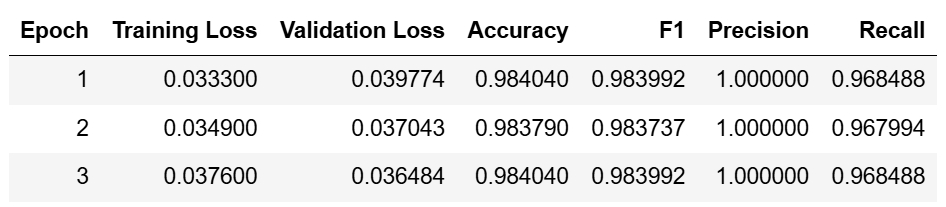
After completing the model training, let’s test it out.
from transformers import pipeline
import torch

def test_sentiment(texts, yourmodel):
    """
    Test sentiment analysis model with given texts
    """
    # Create sentiment analyzer pipeline
    analyzer = pipeline(
        "sentiment-analysis",
        model=yourmodel,  # your model from HuggingFace Hub
        tokenizer="bert-base-chinese",
        device=0 if torch.cuda.is_available() else -1
    )

    # Process each text
    for text in texts:
        result = analyzer(text)[0]
        sentiment = "positive" if result['label'] == 'LABEL_1' else "negative"
        print(f"\nText: {text}")
        print(f"Sentiment: {sentiment}")
        print(f"Confidence: {result['score']:.4f}")

# Test with example texts
test_texts = [
    "这家店的菜真香,下次还来!",         # The food is delicious, will come again
    "质量有问题,不推荐购买。",           # Quality issues, not recommended
    "快递很快,包装完整。",               # Fast delivery, good packaging
    "商家态度很不好,生气。",             # Bad merchant attitude, angry
    "非常满意,超出预期。",               # Very satisfied, exceeded expectations
    "难吃到极点,太糟糕了。",             # Extremely bad taste, terrible
    "穿着很舒服,尺码合适。",             # Comfortable to wear, good size
    "卖家服务特别好!",                   # Great service from seller
    "不值这个价钱,后悔买了。",           # Not worth the price, regret buying
    "产品完全是垃圾,气死了。"            # Product is totally garbage, very angry
]

# Run the test
test_sentiment(test_texts, "BarryzZ/sentiment-weibo-100k-fine-tuned-bert-test")
Device set to use cuda:0


Text: 这家店的菜真香,下次还来!
Sentiment: positive
Confidence: 1.0000

Text: 质量有问题,不推荐购买。
Sentiment: positive
Confidence: 1.0000

Text: 快递很快,包装完整。
Sentiment: positive
Confidence: 1.0000

Text: 商家态度很不好,生气。
Sentiment: positive
Confidence: 1.0000

Text: 非常满意,超出预期。
Sentiment: positive
Confidence: 1.0000

Text: 难吃到极点,太糟糕了。
Sentiment: positive
Confidence: 1.0000

Text: 穿着很舒服,尺码合适。
Sentiment: positive
Confidence: 1.0000

Text: 卖家服务特别好!
Sentiment: positive
Confidence: 1.0000

Text: 不值这个价钱,后悔买了。
Sentiment: positive
Confidence: 1.0000

Text: 产品完全是垃圾,气死了。
Sentiment: positive
Confidence: 0.9997
There’s clearly an issue with our model’s predictions. The model is:
- Classifying everything as positive (positive sentiment)
- Doing so with extremely high confidence (nearly 100%)
- Failing to identify obvious negative sentiments like “难吃到极点” and “产品完全是垃圾”
These issues are likely due to optimization problems rather than data imbalance. Our adjustments focus on:
- Better monitoring (more frequent evaluation, detailed metrics)
- Improved efficiency (larger batches, mixed precision)
- Extended training (more epochs, early stopping)
Let’s test the model with these optimized parameters.
# Initialize model with same configuration
model = BertForSequenceClassification.from_pretrained(
   'bert-base-chinese',
   num_labels=2
)
model = model.to(device)

# Enhanced training arguments
training_args = TrainingArguments(
   output_dir='sentiment-weibo-100k-fine-tuned-bert',
   num_train_epochs=5,                    # Increased from 3 to 5 for better learning
   per_device_train_batch_size=64,        # Doubled for faster training
   per_device_eval_batch_size=128,        # Doubled for faster evaluation
   learning_rate=2e-5,                    # Kept same learning rate
   warmup_ratio=0.1,                      # Added warmup ratio for smoother training
   weight_decay=0.01,                     # For regularization
   logging_dir='./logs',
   logging_steps=100,
   evaluation_strategy="steps",           # Changed to step-based evaluation
   eval_steps=200,                        # More frequent evaluation
   save_strategy="steps",
   save_steps=200,                        # More frequent model saving
   load_best_model_at_end=True,
   metric_for_best_model="f1_avg",        # Using average F1 score to select best model
   push_to_hub=True,
   gradient_accumulation_steps=1,
   fp16=True                              # Added mixed precision training for efficiency
)

# Enhanced metrics computation function
def compute_metrics(pred):
   """
   Compute detailed metrics including class-specific scores
   Returns metrics for both positive and negative classes
   """
   labels = pred.label_ids
   preds = pred.predictions.argmax(-1)

   precision, recall, f1, _ = precision_recall_fscore_support(
       labels,
       preds,
       average=None,
       labels=[0, 1]
   )
   acc = accuracy_score(labels, preds)
   conf_mat = confusion_matrix(labels, preds)

   return {
       'accuracy': acc,
       'f1_neg': f1[0],                   # Added separate F1 scores
       'f1_pos': f1[1],
       'f1_avg': f1.mean(),
       'precision_neg': precision[0],      # Added class-specific precision
       'precision_pos': precision[1],
       'recall_neg': recall[0],           # Added class-specific recall
       'recall_pos': recall[1],
       'confusion_matrix': conf_mat.tolist()  # Added confusion matrix
   }


# Initialize trainer
trainer = Trainer(
    model=model,
    args=training_args,
    train_dataset=train_dataset,
    eval_dataset=test_dataset,
    compute_metrics=compute_metrics,
    callbacks=[EarlyStoppingCallback(early_stopping_patience=3)]
)

# Print dataset statistics before training
print("\nDataset Statistics:")
print(f"Training samples: {len(train_dataset)}")
print(f"Test samples: {len(test_dataset)}")
print("\nLabel Distribution:")
print("Training:", pd.Series([d['labels'].item() for d in train_dataset]).value_counts())
print("Testing:", pd.Series([d['labels'].item() for d in test_dataset]).value_counts())

# Start training
trainer.train()

# Evaluate model
eval_results = trainer.evaluate()
print("\nFinal Evaluation Results:")
for metric, value in eval_results.items():
    if isinstance(value, float):
        print(f"{metric}: {value:.4f}")
    else:
        print(f"{metric}: {value}")
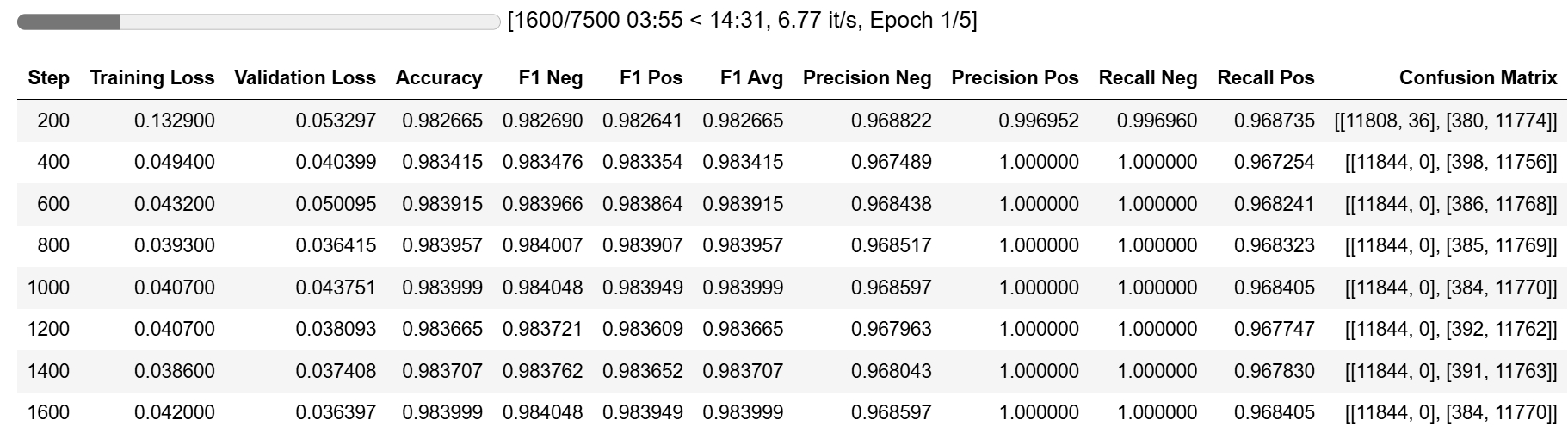
The model achieved excellent metrics after just one epoch.
# Test with example texts
test_texts = [
    "这家店的菜真香,下次还来!",         # The food is delicious, will come again
    "质量有问题,不推荐。",           # Quality issues, not recommended
    "快递很快,包装完整。",               # Fast delivery, good packaging
    "商家态度不好,生气。",             # Bad merchant attitude, angry
    "非常满意,超出预期。",               # Very satisfied, exceeded expectations
    "难吃到极点,太糟糕了。",             # Extremely bad taste, terrible
    "穿着很舒服,尺码合适。",             # Comfortable to wear, good size
    "卖家服务特别好!",                   # Great service from seller
    "不值这个价钱,后悔买了。",           # Not worth the price, regret buying
    "产品完全是垃圾,气死了。"            # Product is totally garbage, very angry
]

# Run the test
test_sentiment(test_texts, "BarryzZ/sentiment-weibo-100k-fine-tuned-bert")
Device set to use cuda:0


Text: 这家店的菜真香,下次还来!
Sentiment: positive
Confidence: 0.9923

Text: 质量有问题,不推荐。
Sentiment: negative
Confidence: 0.8533

Text: 快递很快,包装完整。
Sentiment: positive
Confidence: 0.9878

Text: 商家态度不好,生气。
Sentiment: negative
Confidence: 0.9732

Text: 非常满意,超出预期。
Sentiment: positive
Confidence: 0.9791

Text: 难吃到极点,太糟糕了。
Sentiment: negative
Confidence: 0.8653

Text: 穿着很舒服,尺码合适。
Sentiment: positive
Confidence: 0.9907

Text: 卖家服务特别好!
Sentiment: positive
Confidence: 0.9922

Text: 不值这个价钱,后悔买了。
Sentiment: negative
Confidence: 0.8147

Text: 产品完全是垃圾,气死了。
Sentiment: negative
Confidence: 0.9863
After parameter optimization, our model shows significant improvements.
Let’s test it with some new scenarios to verify its robustness.
test_texts = [
    # Strong positive / 强烈正面
    "我考上研究生了!",  # I got accepted into graduate school!
    "今天他向我求婚了!",  # He proposed to me today!
    "终于买到梦想的房子",  # Finally bought my dream house
    "中了五百万大奖!",  # Won a 5 million prize!

    # Strong negative / 强烈负面
    "被裁员了,好绝望",  # Got laid off, feeling desperate
    "信任的人背叛我",  # Betrayed by someone I trusted
    "重要的文件全丢了",  # Lost all important documents
    "又被扣工资了,气死",  # Got my salary deducted again, so angry

    # Anger / 愤怒
    "偷我的车,混蛋!",  # Someone stole my car, bastard!
    "骗子公司,我要报警",  # Scam company, I'm calling the police
    "半夜装修,烦死了",  # Renovation at midnight, so annoying
    "商家太坑人了!",  # The merchant is such a ripoff!

    # Pleasant surprise / 惊喜
    "宝宝会走路了!",  # Baby learned to walk!
    "升职加薪啦!",  # Got promoted with a raise!
    "论文发表成功!",  # Paper got published successfully!
    "收到offer了!"  # Received a job offer!
]
# Run the test
test_sentiment(test_texts, "BarryzZ/sentiment-weibo-100k-fine-tuned-bert")
Device set to use cuda:0
You seem to be using the pipelines sequentially on GPU. In order to maximize efficiency please use a dataset


Text: 我考上研究生了!
Sentiment: positive
Confidence: 0.8713

Text: 今天他向我求婚了!
Sentiment: positive
Confidence: 0.6087

Text: 终于买到梦想的房子
Sentiment: positive
Confidence: 0.7931

Text: 中了五百万大奖!
Sentiment: positive
Confidence: 0.6070

Text: 被裁员了,好绝望
Sentiment: negative
Confidence: 0.9973

Text: 信任的人背叛我
Sentiment: negative
Confidence: 0.9572

Text: 重要的文件全丢了
Sentiment: negative
Confidence: 0.9941

Text: 又被扣工资了,气死
Sentiment: negative
Confidence: 0.9963

Text: 偷我的车,混蛋!
Sentiment: negative
Confidence: 0.9664

Text: 骗子公司,我要报警
Sentiment: negative
Confidence: 0.9750

Text: 半夜装修,烦死了
Sentiment: negative
Confidence: 0.9906

Text: 商家太坑人了!
Sentiment: negative
Confidence: 0.8367

Text: 宝宝会走路了!
Sentiment: positive
Confidence: 0.9125

Text: 升职加薪啦!
Sentiment: positive
Confidence: 0.9727

Text: 论文发表成功!
Sentiment: positive
Confidence: 0.9998

Text: 收到offer了!
Sentiment: positive
Confidence: 0.7036
The optimized model shows excellent performance in Chinese sentiment analysis. It now correctly identifies both positive and negative sentiments with appropriate confidence levels, while maintaining more moderate confidence for nuanced cases.